


Microsoft Core Solutions of Microsoft SharePoint Server 2013 (70-331日本語版) - 70-331日本語 Exam Questions
QUESTION NO: 1

Correct Answer: A
Explanation: Only visible for Pass4Test members. You can sign-up / login (it's free).
QUESTION NO: 2
DRAG DROP


DRAG DROP
Correct Answer:

Explanation:
Box 1: Install Windows Server 2012 and SQL Server 2012 on physical machines. Box 2: Configure Server01 as a principal server and Server02 as a mirror server. Box 3: Configure Server03 as a log shipping destination.
Note:
*From scenario:
/ All servers must be virtualized unless otherwise specified.
/ The database servers must be physical machines running Windows Server 2012 with
direct access to storage.
/ All database transaction logs must be sent off-site.
(so we configure log shipping destination on Server3 which is located in New York - while
server1 and server2 are both in Chicago).
/ The database servers must be configured for redundancy.
*SQL Server Log shipping allows you to automatically send transaction log backups from a
primary database on a primary server instance to one or more secondary databases on
separate secondary server instances.
QUESTION NO: 3

Correct Answer: B
QUESTION NO: 4
HOTSPOT


HOTSPOT
Correct Answer:

Explanation:

Note:
*From scenario: Allow administrators to promote search query results across the entire company.
*Query rules are composed of three components:
Condition - When to apply the rule?
Action - What to do when the rule is matched?
Publishing - When should the rule be active?
*Actions
Once the condition has been configured the fun begins! The next step is to decide what to do when the query rule applies. Essentially there are three options here:
Add Promoted Result Add Result Block Change ranked results by changing the query * Add Promoted Result - A promoted result is a result that appears at the top of the search results, this is particularly useful way to promote a particular search result. For example, you may want a query for "human resources info" to promote a link to the human resources SharePoint Site.
QUESTION NO: 5
DRAG DROP


DRAG DROP
Correct Answer:

Explanation:

https://technet.microsoft.com/en-us/library/dn518363.aspx
QUESTION NO: 6

Correct Answer: A
Explanation: Only visible for Pass4Test members. You can sign-up / login (it's free).
QUESTION NO: 7
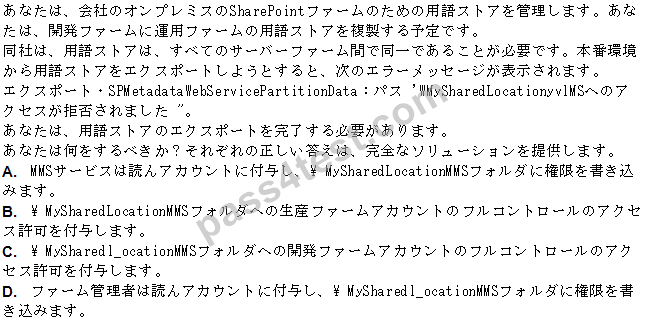
Correct Answer: D
QUESTION NO: 8
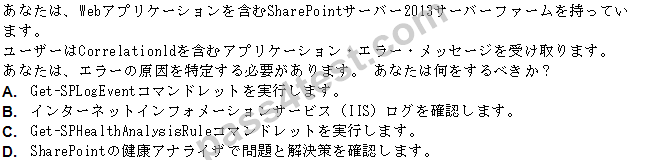
Correct Answer: A
QUESTION NO: 9
DRAG DROP
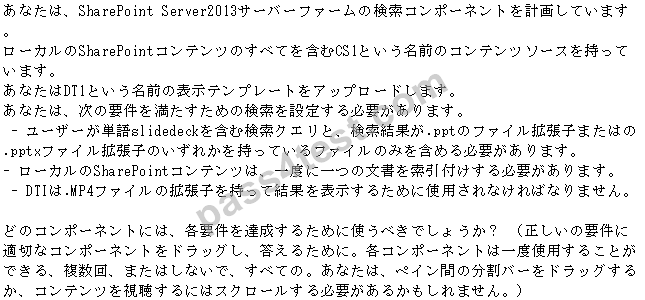

DRAG DROP
Correct Answer:

Explanation:

Note: *query rules Without any custom code, you can help searches respond to the intent of your users by creating query rules. In a query rule, you specify conditions and correlated actions. When a query meets the conditions, the search system performs the actions to improve the relevance of the search results.
*crawler impact rule Applies To: Office SharePoint Server 2007 A crawler impact rule defines the rate at which the Windows SharePoint Services Help Search service requests documents from a Web site during crawling. The rate can be defined either as the number of simultaneous documents requested or as the delay between requests. You can use crawler impact rules to modify loads placed on sites when you crawl them.
*Result type To display search results differently, search results have to be sorted into different result types. A result type distinguishes one search result from another. For example, if a search result is found in a Microsoft Word document, that search result belongs to the Microsoft Word result type. If a search result is found in a PDF file, that search result belongs to
the PDF result type.

