


Microsoft Administering and Deploying System Center 2012 Configuration Manager - 70-243 Exam Questions
QUESTION NO: 1
HOTSPOT
You have a System Center 2012 R2 Configuration Manager Service Pack 1 (SP1) deployment.
The relevant Configuration Manager client computers are configured as shown in the following table.

You create a user collection named Collection1. You add User1 and User2 to Collection1.
You create an application named App1. App1 has one deployment type and the following requirements:

You deploy App1 to Collection1 as a required deployment. The deadline is set to the default.
You need to identify which status will appear for the App1 deployment before the users log on to a computer and after the users log on to the computer.
What should you identify? To answer, select the appropriate options in the answer area.

HOTSPOT
You have a System Center 2012 R2 Configuration Manager Service Pack 1 (SP1) deployment.
The relevant Configuration Manager client computers are configured as shown in the following table.
You create a user collection named Collection1. You add User1 and User2 to Collection1.
You create an application named App1. App1 has one deployment type and the following requirements:
You deploy App1 to Collection1 as a required deployment. The deadline is set to the default.
You need to identify which status will appear for the App1 deployment before the users log on to a computer and after the users log on to the computer.
What should you identify? To answer, select the appropriate options in the answer area.
Correct Answer:

QUESTION NO: 2
You are a network administrator for a company named Contoso, Ltd.
The network contains an Active Directory forest named contoso.com.
The forest contains a System Center 2012 R2 Configuration Manager Service Pack 1 (SP1) environment.
Client Push is enabled.
Contoso acquires a company named Litware, Inc. Litware has an Active Directory forest name litwareinc.com.
The litwareinc.com forest contains a System Center 2012 Configuration Manager environment.
The environment contains a single site.
You configure a two-way forest trust between the forests.
You need to ensure that all of the client computers in the litwareinc.com forest are managed by System Center 2012 R2 Configuration Manager Service Pack 1 (SP1) in the contoso.com forest.
What should you do?
You are a network administrator for a company named Contoso, Ltd.
The network contains an Active Directory forest named contoso.com.
The forest contains a System Center 2012 R2 Configuration Manager Service Pack 1 (SP1) environment.
Client Push is enabled.
Contoso acquires a company named Litware, Inc. Litware has an Active Directory forest name litwareinc.com.
The litwareinc.com forest contains a System Center 2012 Configuration Manager environment.
The environment contains a single site.
You configure a two-way forest trust between the forests.
You need to ensure that all of the client computers in the litwareinc.com forest are managed by System Center 2012 R2 Configuration Manager Service Pack 1 (SP1) in the contoso.com forest.
What should you do?
Correct Answer: D
QUESTION NO: 3
Your network contains a single Active Directory forest named contoso.com.
Contoso.com contains three System Center 2012 Configuration Manager sites and one
System Center Configuration Manager 2007 site.
You need to ensure that you can transfer objects from Configuration Manager 2007 to
Configuration Manager 2012.
What should you do?
Your network contains a single Active Directory forest named contoso.com.
Contoso.com contains three System Center 2012 Configuration Manager sites and one
System Center Configuration Manager 2007 site.
You need to ensure that you can transfer objects from Configuration Manager 2007 to
Configuration Manager 2012.
What should you do?
Correct Answer: C
Explanation: Only visible for Pass4Test members. You can sign-up / login (it's free).
QUESTION NO: 4
HOTSPOT
HOTSPOT
You deploy System Center 2012 R2 Configuration Manager Service Pack 1 (SP1) to a server named Server1.
Configuration Manager manages all of the client computers, including a computer named
Client1.
A hardware inventory cycle is initiated on Client1.
You need to identify which Inventory classes were collected on Client1 and when the inventory was added to the site database.
Which log files should you review? To answer, select the appropriate options in the answer area.


HOTSPOT
HOTSPOT
You deploy System Center 2012 R2 Configuration Manager Service Pack 1 (SP1) to a server named Server1.
Configuration Manager manages all of the client computers, including a computer named
Client1.
A hardware inventory cycle is initiated on Client1.
You need to identify which Inventory classes were collected on Client1 and when the inventory was added to the site database.
Which log files should you review? To answer, select the appropriate options in the answer area.
Correct Answer:

Explanation:

* Example: The InventoryAgent.log will show that fournew attributes regarding the Class
"Department_Name" need to be collected for hardware Inventory data and that info needs to be sent to server.
Content of inventoryagent.log:

* Example of contents of dataldr.log:

QUESTION NO: 5
Note: This question is part of a series of questions that use the same or similar answer choices. An answer choice may be correct for more than one question in the series. Each question is independent of the other questions in this series. Information and details provided in a question apply only to that question.
Your network contains a System Center 2012 Configuration Manager Service Pack 1(SP1) environment.
You discover that information about installed applications fails to appear in the report named Software registered in Add Remove Programs on a specific client computer.
You need to ensure that information about installed applications appears in the report.
What should you do?
Note: This question is part of a series of questions that use the same or similar answer choices. An answer choice may be correct for more than one question in the series. Each question is independent of the other questions in this series. Information and details provided in a question apply only to that question.
Your network contains a System Center 2012 Configuration Manager Service Pack 1(SP1) environment.
You discover that information about installed applications fails to appear in the report named Software registered in Add Remove Programs on a specific client computer.
You need to ensure that information about installed applications appears in the report.
What should you do?
Correct Answer: D
QUESTION NO: 6
DRAG DROP
Your network contains a System Center 2012 R2 Configuration Manager Service Pack 1
(SP1) environment.
You create a collection named All Managed Servers.
You need to inventory the environment variables of the All Managed Servers collection.
Which four actions should you perform in sequence? To answer, move the appropriate actions from the list of actions to the answer area and arrange them in the correct order.

DRAG DROP
Your network contains a System Center 2012 R2 Configuration Manager Service Pack 1
(SP1) environment.
You create a collection named All Managed Servers.
You need to inventory the environment variables of the All Managed Servers collection.
Which four actions should you perform in sequence? To answer, move the appropriate actions from the list of actions to the answer area and arrange them in the correct order.
Correct Answer:

Explanation:

* Win32_Environment class (Windows)
TheWin32_Environment WMI class represents an environment or system environment setting on a Windows computer system. Querying this class returns environment variables found in:
HKEY_LOCAL_MACHINE\System\CurrentControlSet\Control\Sessionmanager\Environme nt
And HKEY_USERS\<user>\Environment
Since we need to inventory WMI information, that means we need Hardware Inventory and you can only do that with a Custom Client Device Setting:


QUESTION NO: 7
Your network contains an Active Directory forest named litwareinc.com.
The forest has a single domain.
The forest contains a System Center 2012 Configuration Manager environment.
The environment contains a single primary site.
You create a group named InstallTechs.
You need to ensure that the members of InstallTechs can deploy Applications to desktop computers by using Configuration Manager.
The solution must minimize the number of permissions assigned to InstallTechs.
What should you do?
Your network contains an Active Directory forest named litwareinc.com.
The forest has a single domain.
The forest contains a System Center 2012 Configuration Manager environment.
The environment contains a single primary site.
You create a group named InstallTechs.
You need to ensure that the members of InstallTechs can deploy Applications to desktop computers by using Configuration Manager.
The solution must minimize the number of permissions assigned to InstallTechs.
What should you do?
Correct Answer: C
Explanation: Only visible for Pass4Test members. You can sign-up / login (it's free).
QUESTION NO: 8
HOTSPOT
Your network contains a single Active Directory named contoso.com. A System Center
2012 R2 Configuration Manager Service Pack 1 (SP1) primary site named S01 is deployed to contoso.com.
The Configuration Manager deployment includes the servers configured as shown in the following table.

The distribution point is configured to require HTTPS for client communications.
You have a domain computer named Computer1 that runs the 64-bit version of Windows
8.1.
You need to install the Configuration Manager client on Computer1 manually.
Which network location should you use to start the installation? To answer, select the appropriate options in the answer area.


HOTSPOT
Your network contains a single Active Directory named contoso.com. A System Center
2012 R2 Configuration Manager Service Pack 1 (SP1) primary site named S01 is deployed to contoso.com.
The Configuration Manager deployment includes the servers configured as shown in the following table.
The distribution point is configured to require HTTPS for client communications.
You have a domain computer named Computer1 that runs the 64-bit version of Windows
8.1.
You need to install the Configuration Manager client on Computer1 manually.
Which network location should you use to start the installation? To answer, select the appropriate options in the answer area.
Correct Answer:

Explanation:

You can manually install the System Center 2012 Configuration Manager client software on computers in your enterprise by using the CCMSetup.exeprogram. This program and its supporting files can be found in the Client folder of the System Center 2012 Configuration
Manager installation folder on the site server and on management points in your site. This folder is shared to the network as <Site Server Name>\SMS_<Site Code>\Client.
QUESTION NO: 9
Your network contains a System Center 2012 R2 Configuration Manager Service Pack 1
(SP1) environment.
You deploy a Microsoft Office 2010 package to all client computers by using Configuration
Manager.
Your company purchases Office 2013.
You need to ensure that all users can install Office 2013 from the Application Catalog.
What should you do?
Your network contains a System Center 2012 R2 Configuration Manager Service Pack 1
(SP1) environment.
You deploy a Microsoft Office 2010 package to all client computers by using Configuration
Manager.
Your company purchases Office 2013.
You need to ensure that all users can install Office 2013 from the Application Catalog.
What should you do?
Correct Answer: C
Explanation: Only visible for Pass4Test members. You can sign-up / login (it's free).
QUESTION NO: 10
Your network contains a System Center 2012 Configuration Manager environment.
You need to use the Configuration Manager console to identify service level agreement
(SLA) issues among non-compliant clients.
What should you do?
Your network contains a System Center 2012 Configuration Manager environment.
You need to use the Configuration Manager console to identify service level agreement
(SLA) issues among non-compliant clients.
What should you do?
Correct Answer: A
QUESTION NO: 11
You have a System Center 2012 R2 Configuration Manager Service Pack 1 (SP1) deployment.
All of the client computers in the marketing department are in two device collections named
Collection1 and Collection2.
Configuration Manager has the client settings configured as shown in the following table.

Remote Tools is disabled for all three client settings.
You need to enable Remote Tools for the marketing department computers.
What should you do?
You have a System Center 2012 R2 Configuration Manager Service Pack 1 (SP1) deployment.
All of the client computers in the marketing department are in two device collections named
Collection1 and Collection2.
Configuration Manager has the client settings configured as shown in the following table.
Remote Tools is disabled for all three client settings.
You need to enable Remote Tools for the marketing department computers.
What should you do?
Correct Answer: C
Explanation: Only visible for Pass4Test members. You can sign-up / login (it's free).
QUESTION NO: 12
Your network contains a Windows Server Update Services (WSUS) server. All client computers are configured as WSUS clients.
All of the client computers have Windows Firewall enabled. Windows Firewall is configured to block File and Printer Sharing.
Users are not configured as local Administrators on their client computers.
You deploy System Center 2012 Configuration Manager.
You need to identify which methods you can use to deploy the Configuration Manager client to all of the client computers.
Which client installation methods should you identify? (Choose all that Apply.)
Your network contains a Windows Server Update Services (WSUS) server. All client computers are configured as WSUS clients.
All of the client computers have Windows Firewall enabled. Windows Firewall is configured to block File and Printer Sharing.
Users are not configured as local Administrators on their client computers.
You deploy System Center 2012 Configuration Manager.
You need to identify which methods you can use to deploy the Configuration Manager client to all of the client computers.
Which client installation methods should you identify? (Choose all that Apply.)
Correct Answer: B,D,E
Explanation: Only visible for Pass4Test members. You can sign-up / login (it's free).
QUESTION NO: 13
You have a System Center 2012 R2 Configuration Manager Service Pack 1 (SP1) deployment.
You have the following types of mobile devices:
Windows 8.1
Android 5.0
IOS 7
You plan to use Configuration Manager to manage the mobile devices.
You need to recommend a solution to deploy VPN profiles and Wi-Fi profiles to the mobile devices.
What should you include in the recommendation?
You have a System Center 2012 R2 Configuration Manager Service Pack 1 (SP1) deployment.
You have the following types of mobile devices:
Windows 8.1
Android 5.0
IOS 7
You plan to use Configuration Manager to manage the mobile devices.
You need to recommend a solution to deploy VPN profiles and Wi-Fi profiles to the mobile devices.
What should you include in the recommendation?
Correct Answer: A
QUESTION NO: 14
DRAG DROP
DRAG DROP
Your network contains a System Center 2012 R2 Configuration Manager Service Pack 1
(SPl) environment.
Your company has a finance department that contains 100 client computers. Only some of the client computers have the Microsoft Application Virtualization (App-V) client installed.
You have a new application named App1.
You need to deploy App1 to all of the users in the finance department.
Which three actions should you perform in sequence? To answer, move the appropriate actions from the list of actions to the answer area and arrange them in the correct order.

DRAG DROP
DRAG DROP
Your network contains a System Center 2012 R2 Configuration Manager Service Pack 1
(SPl) environment.
Your company has a finance department that contains 100 client computers. Only some of the client computers have the Microsoft Application Virtualization (App-V) client installed.
You have a new application named App1.
You need to deploy App1 to all of the users in the finance department.
Which three actions should you perform in sequence? To answer, move the appropriate actions from the list of actions to the answer area and arrange them in the correct order.
Correct Answer:

QUESTION NO: 15
HOTSPOT
HOTSPOT
You have a System Center 2012 R2 Configuration Manager Service Pack 1 (SP1) deployment.
You use Configuration Manager to deploy Windows 8.1 to client computers.
You need to encrypt the contents of the operating system volume during the operating system deployment and to store recovery keys in Active Directory. The solution must minimize the amount of time required to deploy the operating system.
Which task sequence steps should you use to perform each task? To answer, select the appropriate options in the answer area.

HOTSPOT
HOTSPOT
You have a System Center 2012 R2 Configuration Manager Service Pack 1 (SP1) deployment.
You use Configuration Manager to deploy Windows 8.1 to client computers.
You need to encrypt the contents of the operating system volume during the operating system deployment and to store recovery keys in Active Directory. The solution must minimize the amount of time required to deploy the operating system.
Which task sequence steps should you use to perform each task? To answer, select the appropriate options in the answer area.
Correct Answer:

Explanation:
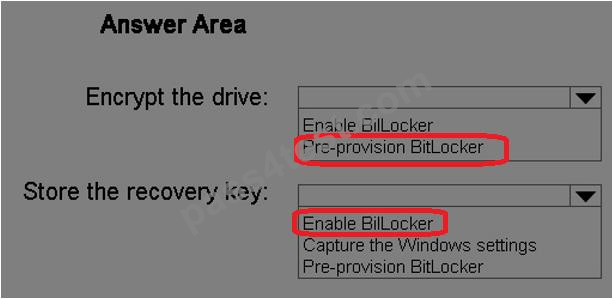
* Pre-provision BitLocker
This step enables BitLocker on adrive while in Windows PE. Only the used drive space is encrypted. Because you partitioned and formatted the hard drive in the previous step, there is no data, andencryption completes very quickly.
* Enable BitLocker
This step enables BitLocker encryption on the hard drive and sets key protectors. Because the hard drive was pre-provisioned with BitLocker, this step completes very quickly.
Windows 7/8/10 requires that you add a key protector.
Note: The Pre-provision BitLocker task sequence step in Microsoft System Center 2012
Configuration Manager allows you to enable BitLocker from the Windows Preinstallation
Environment (Windows PE) prior to operating system deployment. Only the used drive space is encrypted, and therefore, encryption times are much faster.
References: https://technet.microsoft.com/en-us/library/dn456883.aspx

